

Uptime and monitoring
RailsFast comes preconfigured with the allgood gem for health checks / smoke tests.
You can see all your current health checks by navigating to /healthcheck:
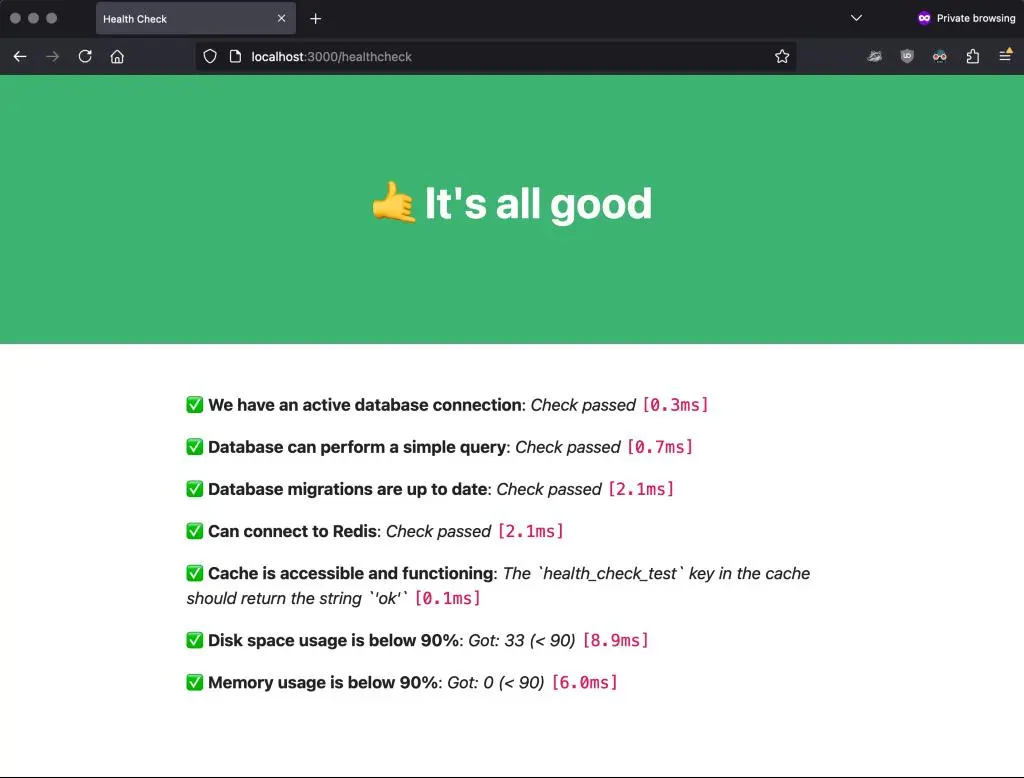
By default, we check things like whether the database is up and running, the server has enough disk and memory, etc. You can customize your health checks by editing your config/allgood.rb file. Check the allgood docs to know everything you can add to check the health of your app!
The recommended use of this /healthcheck endpoint is to use it together with an uptime monitoring service like UptimeRobot. In UptimeRobot, you'd just add https://YOURAPP.COM/healthcheck as an URL to monitor every 5 minutes, and whenever any of the checks fail, you'd get a notification, a call, or a text, depending on what you have configured. It's very useful to quickly know if there's anything wrong with your app and fix it before any of your users notice!
Background job tripwires
Solid Queue can stop working without a single error: a worker that no longer works a queue, a dead scheduler, a backlog growing quietly. config/allgood.rb watches for each, in production:
- Job queue is not backing up. Each queue's oldest waiting job must be younger than its limit: 5 minutes by default, or the queue's own line in
queue_wait_limits. A job scheduled for a time already past counts as waiting, which is what a dead dispatcher leaves behind. - Jobs run on every queue.
QueueHeartbeatJobruns every minute on each queue inheartbeat_queues(config/recurring.yml) and writes its time into the cache. The check goes red when a beat is older than the queue's wait limit plus two minutes: the scheduler died, no live worker works that queue, or every thread of its workers is stuck.
If you deploy more than one job role (config/deploy.yml has a commented example), give each role a heartbeat on one of its queues: a queue_heartbeat_<queue> entry in config/recurring.yml, the queue in heartbeat_queues, and the key in the check's required list. A test fails when a role has none.
Telegram admin notifications (telegrama)
RailsFast also ships with the telegrama gem so your app can DM you (or a team supergroup) when things happen: new signups, new subscriptions, failed payments, exceptions: whatever you decide to instrument.
To turn it on: create a Telegram bot with @BotFather and put the bot token and your chat ID in your credentials, under telegram: → bot_token and chat_id for the environment (config/initializers/telegrama.rb reads them from there). Then send messages from anywhere in your app:
Telegrama.send_message("💸 New subscription: #{user.email}")An optional message_thread_id in the same credentials block routes messages into one topic of a supergroup, useful to split signups, payments and errors into their own threads. Since 0.4 a message can carry buttons, such as a link straight to the admin page that needs a human:
Telegrama.send_message("Payment failed: #{org.name}", reply_markup: Telegrama::InlineKeyboard.url("Open in admin" => madmin_organization_url(org)))If you turn on deliver_message_async in the initializer, pass the keyboard as .to_h so Active Job can serialize it. Full configuration in the telegrama README.