

Organizations & Teams
RailsFast comes with a full multi-tenant organizations system out of the box. Users get a personal workspace on signup, can create additional organizations, invite teammates, and manage roles and permissions.
We leverage the organizations gem for this.
What you get out of the box
When a user signs up, they automatically get a personal organization called "My Workspace". No onboarding screen, no friction - they go straight to the dashboard.
From there, users can:
- Create additional organizations for teams or projects
- Invite teammates via email with role-based permissions
- Switch between organizations using the org switcher in the header
- Manage team members from the Settings page (invite, remove, change roles)
Organization switcher
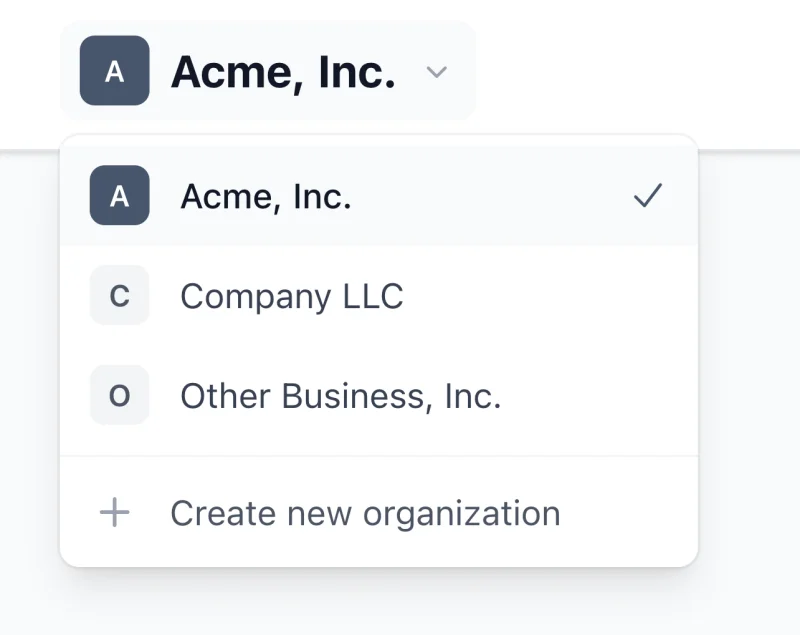
The dashboard header includes an organization switcher dropdown (both mobile and desktop). Users can quickly switch between their organizations:
<%# Already included in the dashboard header %>
<%= render "components/railsfast/organizations/switcher" %>
The switcher shows:
- Current organization with a checkmark
- Other organizations the user belongs to
- "Create new organization" link
Team management in Settings
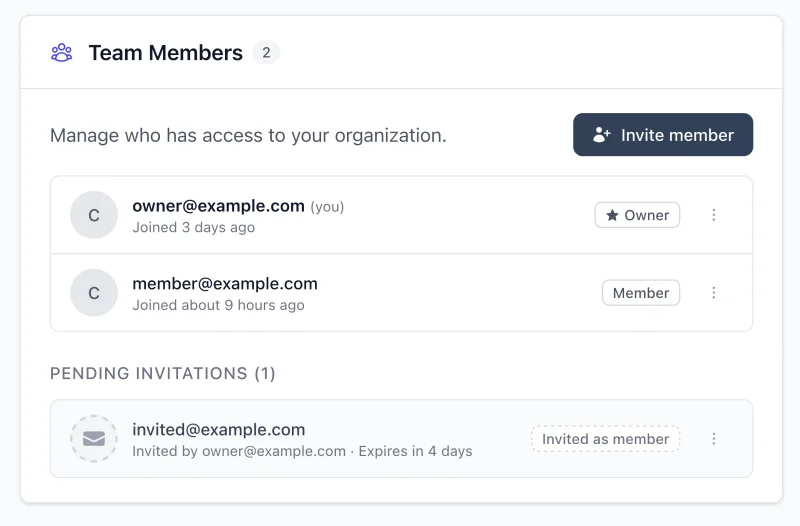
The Settings page includes full team management UI:
- Organization section - rename the organization
- Team Members section - view all members, invite new ones, change roles, remove members
- Plan & Billing section - subscription status and billing management (organization-level)
All team management is permission-based. Only owners and admins can invite/remove members and change roles.
Roles and permissions
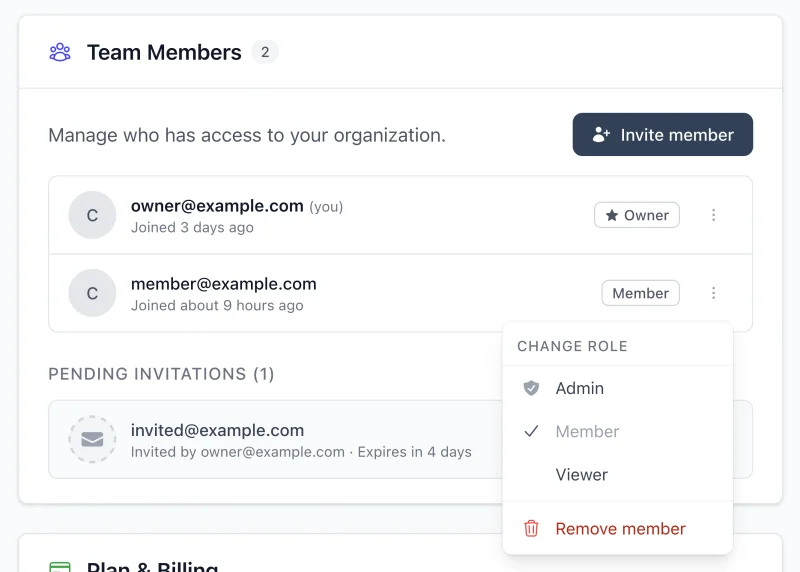
RailsFast uses the default role hierarchy:
owner > admin > member > viewer
Each role inherits permissions from roles below it:
| Permission | Viewer | Member | Admin | Owner |
|---|---|---|---|---|
| View organization | ✓ | ✓ | ✓ | ✓ |
| View members | ✓ | ✓ | ✓ | ✓ |
| Create resources | ✓ | ✓ | ✓ | |
| Edit own resources | ✓ | ✓ | ✓ | |
| Invite members | ✓ | ✓ | ||
| Remove members | ✓ | ✓ | ||
| Edit member roles | ✓ | ✓ | ||
| Manage billing | ✓ | |||
| Transfer ownership | ✓ | |||
| Delete organization | ✓ |
You can customize roles in config/initializers/organizations.rb.
Organization-level billing
By default, RailsFast ships with billing at the organization level (not user level). This is the standard B2B SaaS pattern where:
- Organizations have subscriptions, not individual users
- All team members share the organization's plan
- Plan limits apply to the organization (e.g., team member seats)
The default checkout and billing flow is built around current_organization, so this is the path that works out of the box for standard B2B apps.
This is configured in app/models/concerns/organization_extensions.rb:
# Subscriptions are at the organization level
pay_customer default_payment_processor: :stripe

# Plan limits enforcement
include PricingPlans::PlanOwner
Team member seat limits
RailsFast automatically enforces team member limits based on the organization's plan. Configure limits in your pricing_plans.rb:
plan :pro do
  limits :team_members, to: 10
  # ...
end
When an organization reaches their seat limit, invitations are blocked with a friendly upgrade message.
Invitation emails
Team invitations are sent using beautiful Goodmail templates. The invitation email includes:
- Who invited them
- Which organization they're joining
- A secure accept link
When the invitee clicks the link, they see a clean accept page showing the organization, who invited them, and their assigned role:
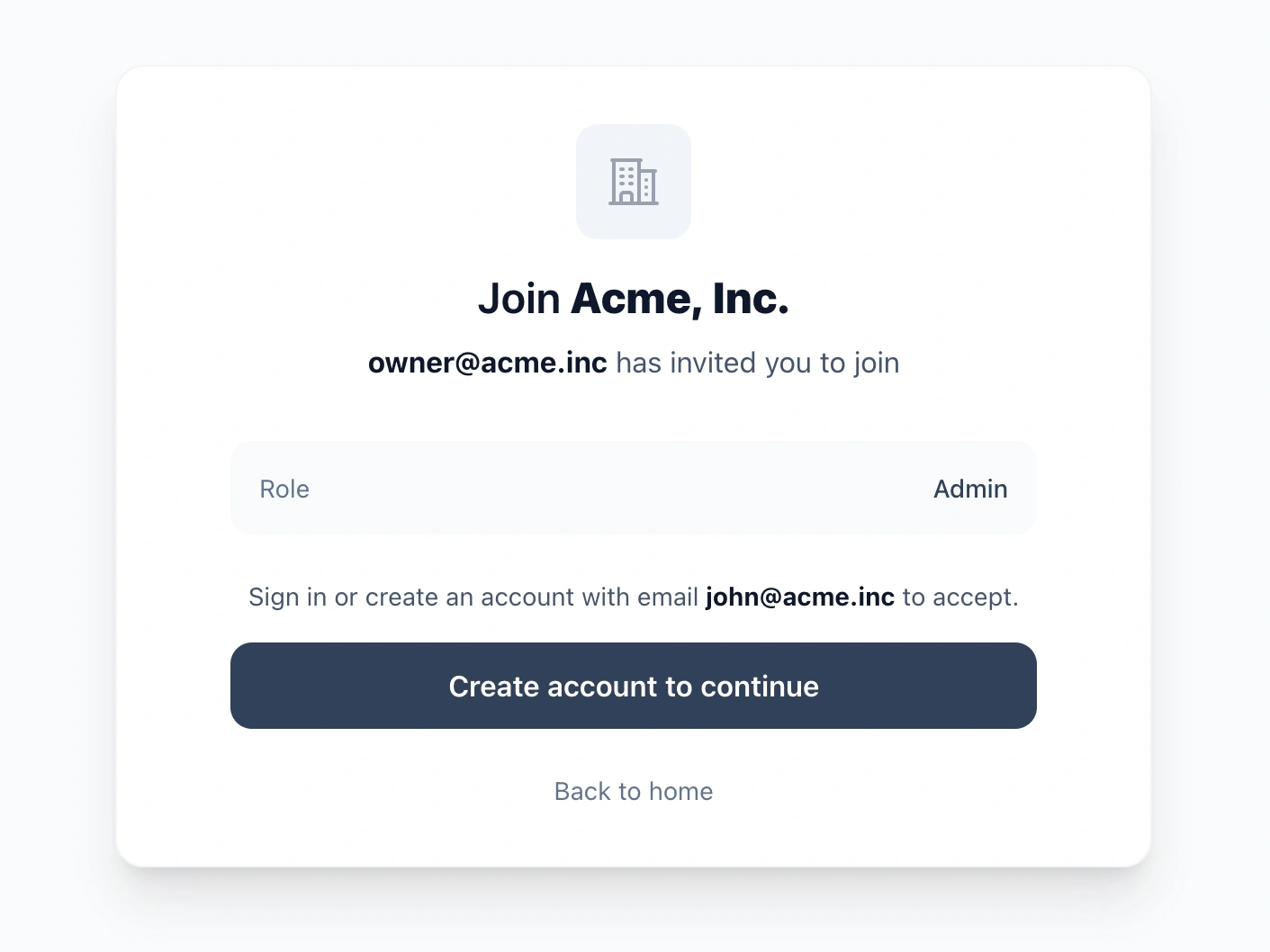
If they're not signed in, they can create an account or sign in to accept. Invitations expire after 7 days by default (configurable).
Using organizations in your code
Current organization
Access the current organization anywhere:
# In controllers
current_organization          # => Organizations::Organization
current_organization.name     # => "Acme Corp"

# Require organization (redirects if none)
before_action :require_organization!
Role checks
# Boolean checks
current_user.is_organization_owner?
current_user.is_organization_admin?
current_user.is_organization_member?

# Permission checks
current_user.has_organization_permission_to?(:invite_members)
current_user.has_organization_permission_to?(:manage_billing)
Scoping resources to organizations
For organization-scoped resources, inherit from DemoController — the base controller for the signed-in app area, which resolves current_organization for you (rename it to whatever fits your product; it's the controller behind /dashboard and /settings):
class ProjectsController < DemoController
  def index
    @projects = current_organization.projects
  end
end
This automatically:
- Requires authentication
- Requires organization membership
- Uses the dashboard layout
Delegated methods
The User model delegates common organization methods:
# These work on current_user
current_user.organization_name      # => "Acme Corp"
current_user.current_plan           # => PricingPlan
current_user.subscribed?            # => true/false
current_user.current_subscription   # => Pay::Subscription
Configuration
All organization settings live in config/initializers/organizations.rb:
Organizations.configure do |config|
  # Auto-create "My Workspace" on signup
  config.always_create_personal_organization_for_each_user = true
  config.default_organization_name = "My Workspace"

  # Invitation settings
  config.invitation_expiry = 7.days
  config.default_invitation_role = :member

  # Beautiful invitation emails
  config.invitation_mailer = "OrganizationInvitationGoodmailer"

  # Redirects
  config.after_organization_created_redirect_path = "/dashboard"
  config.redirect_path_after_invitation_accepted = "/dashboard"

  # Enforce seat limits
  config.on_member_invited do |ctx|
    limit = ctx.organization.current_plan&.limit_for(:team_members)
    if limit && ctx.organization.memberships_count >= limit
      raise Organizations::InvitationError,
        "You've reached your plan's team member limit."
    end
  end
end
Architecture patterns: User-based vs Organization-based
Before diving into customization, it's worth understanding when resources should belong to organizations vs users. This decision affects your entire data model.
There are really three separate questions here:
- Who owns the resource?
- Who pays for access?
- Are organizations required, optional, or just a reporting layer?
Don't collapse those into one decision. In many apps, the right answer is:
- resources belong to users
- organizations are optional
- billing may exist at the organization level, user level, or both
The key question
Ask yourself: "Who owns this resource semantically?"
Consider a fitness tracking app where users log workouts. If a user leaves their gym, do their workouts stay with the gym or go with the user? Obviously the user—workouts are personal data, not gym assets.
Now consider a project management tool. If an employee leaves the company, do their projects stay with the company or go with them? The company—projects are corporate assets.
This semantic ownership should drive your architecture.
Don't add organization_id to personal-domain records just because you might want B2B later. If the resource is fundamentally personal, keep it user-owned and let organizations provide access, reporting, or billing on top.
Pattern 1: Organization-based (RailsFast default)
Resources belong to organizations. Billing is at the organization level. This is the standard B2B SaaS pattern.
# Resources belong to organizations
class Project < ApplicationRecord
  belongs_to :organization
end

# Organization has billing (from organization_extensions.rb)
# pay_customer default_payment_processor: :stripe
Use this when:
- Companies are your customers
- Teams share resources (projects, documents, API keys)
- Resources should stay with the company when employees leave
- Billing is per-team
Examples: Project management, CRM, analytics dashboards, API platforms
Pattern 2: User-owned resources with optional organizations
Resources belong to users. Organizations exist for grouping, social features, or B2B dashboards—but they don't own the resources.
Real-world example: A fitness app with gym memberships
Imagine building a workout tracking app where:
- Users log workouts, earn achievements, and track calories and training time
- Users can join gyms (organizations) to participate in challenges and see leaderboards
- Gyms pay a subscription for dashboards showing member activity and engagement stats
- When a user leaves a gym, their workout history goes with them
Here's how to model this:
# Workouts belong to USERS, not organizations
class Workout < ApplicationRecord
  belongs_to :user

  # Workout data
  attribute :exercise_type, :string
  attribute :duration_minutes, :integer
  attribute :calories_burned, :integer
  attribute :completed_at, :datetime
end

class User < ApplicationRecord
  has_organizations  # Can join gyms
  has_many :workouts

  # User's personal stats
  def total_workouts
    workouts.count
  end

  def calories_this_month
    workouts.where(completed_at: Time.current.beginning_of_month..).sum(:calories_burned)
  end
end
The key insight: Users can belong to multiple gyms, but their workouts don't "belong" to any gym. The gym gets a reporting view into member activity, not ownership.
Implementing the gym dashboard
Gyms need to see aggregated member stats. Add reporting methods to Organization via organization_extensions.rb:
# app/models/concerns/organization_extensions.rb
module OrganizationExtensions
  extend ActiveSupport::Concern

  included do
    # Gym pays for dashboard access
    pay_customer default_payment_processor: :stripe
    include PricingPlans::PlanOwner
  end

  # === Member Activity Reporting ===
  # These are READ-ONLY views into member data, not ownership

  def member_workouts(period: nil)
    scope = Workout.where(user_id: users.select(:id))
    scope = scope.where(completed_at: period) if period
    scope
  end

  def gym_stats(period: nil)
    workouts = member_workouts(period: period)
    {
      total_workouts: workouts.count,
      total_calories: workouts.sum(:calories_burned),
      total_minutes: workouts.sum(:duration_minutes),
      active_members: workouts.distinct.count(:user_id),
      avg_workouts_per_member: member_count.positive? ? (workouts.count.to_f / member_count).round(1) : 0
    }
  end

  def leaderboard(period: nil, limit: 10)
    Workout
      .where(user_id: users.select(:id))
      .where(period ? { completed_at: period } : {})
      .group(:user_id)
      .select("user_id, COUNT(*) as workout_count, SUM(calories_burned) as total_calories")
      .order("workout_count DESC")
      .limit(limit)
  end

  def member_engagement_report(period:)
    active_ids = member_workouts(period: period).distinct.pluck(:user_id)
    {
      total_members: member_count,
      active_members: active_ids.count,
      inactive_members: member_count - active_ids.count,
      engagement_rate: member_count.positive? ? ((active_ids.count.to_f / member_count) * 100).round(1) : 0
    }
  end
end
Configuration for User-based apps
If organizations are optional in your app, turn off the personal-workspace default:
# config/initializers/organizations.rb
Organizations.configure do |config|
  # Users can exist without an organization
  config.always_create_personal_organization_for_each_user = false
  config.always_require_users_to_belong_to_one_organization = false

  # ... rest of config
end
This changes the organization behavior, not your whole billing architecture.
Supporting both individual and organization billing
If you want individual users and organizations to have subscriptions:
class User < ApplicationRecord
  has_organizations
  has_many :workouts

  # Individual PRO billing primitive
  pay_customer default_payment_processor: :stripe
end

# Organizations also have subscriptions (dashboard access, analytics, etc.)
# This is already in organization_extensions.rb:
# pay_customer default_payment_processor: :stripe
Now you have two billing paths:
- Individual PRO: User pays for premium personal features
- Organization subscription: Organization pays for reporting, admin tools, team access, etc.
Adding pay_customer to User is only the billing primitive. RailsFast's default checkout, billing portal, pricing UI, and common subscription delegates are still organization-scoped. If you want real dual billing, you will usually need:
- a separate checkout / billing flow for
User - a clear entitlement layer for feature access
- to adjust the default
Userdelegates that pointcurrent_plan,subscribed?, andcurrent_subscriptionatcurrent_organization - to decide whether
Usershould also become aPricingPlans::PlanOwner, instead of assuming that drops in cleanly - discipline around not inferring resource ownership from whoever pays
When to use each pattern
| Question | Organization-based | User-based |
|---|---|---|
| Who's the primary customer? | Companies | Individuals |
| Do resources stay when user leaves? | Yes (company assets) | No (personal data) |
| Is billing per-team or per-user? | Per-team | Per-user (or optional org billing) |
| Are resources shared or personal? | Shared | Personal |
| Example resources | Projects, API keys, team docs | Workouts, recipes, transactions |
The hybrid approach works
The gym example shows you can have both:
- B2C core: Users own their workout history and can use the app solo
- B2B layer: Organizations pay for dashboards showing member activity
This is often the right architecture for:
- Fitness apps with gyms or corporate wellness programs
- Expense trackers with company reporting
- Learning platforms with team/school dashboards
- Any B2C app that might add B2B features later
The organizations gem supports both patterns equally well. The key is deciding upfront:
- Do organizations own resources?
- Or do they provide a lens into user-owned resources?
- And separately, who pays for access?
Danger Zone: Transfer, Delete & Leave
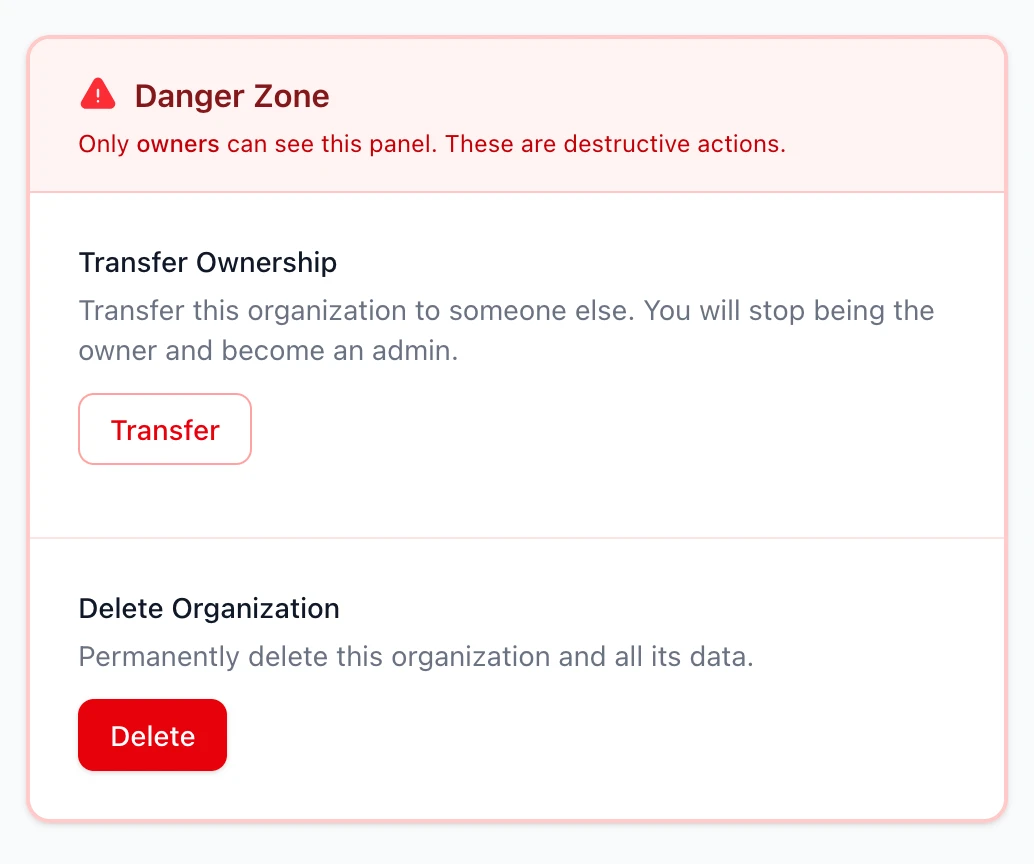
The organization settings page includes a Danger Zone section at the bottom. What users see depends on their role:
- Owners see Transfer Ownership and Delete Organization options
- Non-owners see a Leave Organization option
This is required for account closure—users can't delete their account while they still own organizations.
Transfer ownership
Owners can transfer ownership to any admin in the organization. The transfer flow:
- Click "Transfer" in the Danger Zone
- Select an eligible admin from the list
- Type the organization name to confirm
- The previous owner becomes an admin
Only admins can receive ownership. If you want to transfer to a member, promote them to admin first using the Team Members section.
Delete organization
Owners can permanently delete an organization:
- Click "Delete" in the Danger Zone
- Type the organization name to confirm
- All data is permanently deleted
Both actions use type-to-confirm modals to prevent accidents.
Account closure flow
When a user tries to close their account while owning organizations, they'll see a message explaining they need to transfer ownership or delete those organizations first. The Danger Zone provides the tools to do this.
Leave organization (for non-owners)
Non-owner members see a Leave Organization panel instead of the Danger Zone. This allows them to remove themselves from an organization they no longer want to be part of.
The leave action:
- Removes the user's membership from the organization
- Redirects to the organizations list
- Auto-switches to another organization if available
Owners cannot leave their organization. They must transfer ownership first, or delete the organization entirely.
Hybrid onboarding (invited vs direct signups)
By default, RailsFast creates a "My Workspace" for every new user. But when users sign up via invitation to join an existing organization, creating a personal workspace is unnecessary clutter.
RailsFast implements hybrid onboarding out of the box:
- Direct signups → Get "My Workspace" immediately
- Invited signups → Skip personal workspace, join the invited org directly
This is handled automatically via a flag in the User model and Devise's build_resource hook. You don't need to configure anything.
How it works
The User model overrides the gem's should_create_personal_organization? predicate:
# app/models/user.rb
class User < ApplicationRecord
  has_organizations

  # Skip personal org creation for invited signups
  attr_accessor :skip_personal_organization

  def should_create_personal_organization?
    return false if skip_personal_organization
    super
  end
end
The registrations controller sets the flag before user creation:
# app/controllers/users/registrations_controller.rb
def build_resource(hash = {})
  super
  if pending_organization_invitation?
    resource.skip_personal_organization = true
  end
end
This ensures the flag is set before the user is persisted, so the gem's after_create callback respects it.
Customization options
Users with no organization (B2C / consumer apps)
By default, RailsFast auto-creates a "My Workspace" for every new user. If you want users to have no organization by default (e.g., for B2C consumer apps, or if organizations are optional), just change one line in the initializer:
# config/initializers/organizations.rb
config.always_create_personal_organization_for_each_user = false
That's it for the organizations behavior. New users will sign up without an organization. They can create one later if needed.
If you're also using RailsFast's default org-level billing flow, you may still want to adapt the subscription screens and controllers so they don't assume current_organization.
The User model's has_organizations block inherits from the initializer settings. You only need to use the block if you want to override the global config for a specific model. For most apps, configure everything in the initializer and use a simple has_organizations without a block.
Custom onboarding flow
If you want users to go through an onboarding screen to create their organization:
# config/initializers/organizations.rb
config.always_create_personal_organization_for_each_user = false
config.redirect_path_when_no_organization = "/onboarding/create_organization"
Then uncomment the onboarding route in config/routes.rb. An OnboardingController and view are already included but disabled by default.
Add custom organization fields
To add fields like logo or billing_email:
- Add a migration:
add_column :organizations_organizations, :logo, :string
add_column :organizations_organizations, :billing_email, :string- Permit the params:
# config/initializers/organizations.rb
config.additional_organization_params = [:logo, :billing_email]- Update the organization form partial.
Custom roles
Define custom roles with fine-grained permissions:
config.roles do
  role :viewer do
    can :view_organization
    can :view_members
  end
  role :contributor, inherits: :viewer do
    can :create_resources
    can :edit_own_resources
  end
  role :manager, inherits: :contributor do
    can :invite_members
    can :manage_resources
  end
  role :admin, inherits: :manager do
    can :remove_members
    can :edit_member_roles
  end
  role :owner, inherits: :admin do
    can :manage_billing
    can :transfer_ownership
    can :delete_organization
  end
end
Admin panel
Organizations appear in the Madmin admin panel at /admin/dashboard/organizations. You can view:
- All organizations with member counts
- Subscription status and plan
- Scopes for filtering (active subscribers, on trial, churned, etc.)
Key files
| File | Purpose |
|---|---|
config/initializers/organizations.rb |
Main configuration |
app/models/concerns/organization_extensions.rb |
Pay + PricingPlans integration |
app/models/user.rb |
has_organizations + hybrid onboarding |
app/controllers/users/registrations_controller.rb |
Invitation-aware signup |
app/controllers/demo_controller.rb |
Base controller for org-scoped pages |
app/helpers/organizations_helper.rb |
Role badges and UI helpers |
app/mailers/organization_invitation_goodmailer.rb |
Invitation emails |
app/views/components/railsfast/organizations/ |
UI components (switcher, team list, danger zone) |
app/views/demo/settings/ |
Settings page partials |
app/javascript/controllers/railsfast/organizations/transfer_modal_controller.js |
Transfer ownership modal |
app/javascript/controllers/railsfast/organizations/confirm_modal_controller.js |
Delete confirmation modal |
The organizations gem has many more features! Check out the gem docs for advanced usage like ownership transfer, custom callbacks, Acts As Tenant integration, and more.